|
|
Reviews
Cool New Stuff
Maxtor OneTouch II
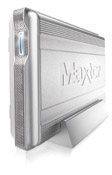 Slick
mass storage with a choice of fast interfaces Slick
mass storage with a choice of fast interfaces
I used to lamely joke that you could never be too rich,
too thin, or have too much drive space, but it turns out that I
was wrong about all three. I now have a terabyte of storage at home
yet I use only a fraction of it. Storage is cheap and reliable nowadays,
but it's the software that we use to fill up the space and keep
it all readily accessible that is the real challenge. Drive giant
Maxtor figures weāll all back up more often (and buy more of their
drives) if all we have to do is push one big button. And so we have
the OneTouch II series, beautifully designed external enclosures
with a great big button on the front to activate the included backup
software. The drives are available in capacities of 100, 200, 250,
and 300 gigs in two interface flavors, USB 2.0 and FireWire 800/400
plus USB 2.0. I can vouch for the stellar performance of the latter
version, as Iāve been using one in my Pro Tools-based recording
studio in FireWire 800 mode. The OneTouch II can keep up with my
far more expensive LaCie Big Disk Extreme running on the FireWire
800 bus and is actually somewhat quieter -- a huge plus in a recording
studio. 7200 rpm goodness in a box that looks like a Star Wars prop,
all at reasonable prices. Sign me up -- I'm shooting for two terabytes,
baby!
$159.95
to $299.95 from maxtor.com
~David MacNeill
WiFinder
Plus
Flying Ethernet packet detector
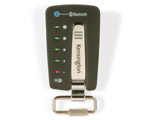 It's
not the smallest WiFi hotspot detector around, but it's the best
looking by far. You'll actually want to hang it off your bag so
everyone knows just how blissfully unwired you are -- or are capable
of being, anyway. This flat little fob detects the 802.11b/g hubs
and indicates their relative strength, though it cannot tell you
if the hub is open or not. It can also detect the presence of another
Bluetooth device or network, so all you toothers can easily scan
for your next illicit pairing. The WiFi Finder Plus is smart enough
to filter out other 2.4 GHz devices like phones and microwaves,
and thereās even a little LED flashlight. This is a great little
product. It's
not the smallest WiFi hotspot detector around, but it's the best
looking by far. You'll actually want to hang it off your bag so
everyone knows just how blissfully unwired you are -- or are capable
of being, anyway. This flat little fob detects the 802.11b/g hubs
and indicates their relative strength, though it cannot tell you
if the hub is open or not. It can also detect the presence of another
Bluetooth device or network, so all you toothers can easily scan
for your next illicit pairing. The WiFi Finder Plus is smart enough
to filter out other 2.4 GHz devices like phones and microwaves,
and thereās even a little LED flashlight. This is a great little
product.
$29.99
from kensington.com
~David MacNeill
Mighty
Mouse
Finally, a modern mouse for all computers
 Many
computer users don't seem to care about which mouse they use. They
adapt to whatever is put in front of them, which is a reasonably
healthy and sustainable way to work. Me, I have to have perfect
uniformity in my input devices. I'm using computers all day and
much of the night and I donāt want to adjust -- I just want everything
to fall to my fingers without having to think about it. Problem
is, until Apple released the Mighty Mouse, I had no acceptable cross-platform
mouse that had the unmatched look and feel weāve all come to expect
from Apple. Sure, there are some fine mice from Kensington and others,
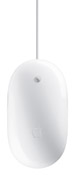
but none really satisfied me. Mighty Mouse does. Using touch-sensing
technology, this mouse manages to act like a multi-button mouse
while looking like a classic Apple Pro model. The iPod-white opaque
plastic body and tiny scroll ball on top are the only indications
that this isnāt the usual fare. Tap on the left and you get a standard
click, tap on the right and you get a right-click. Click the scroll
ball and you get a third action, or squeeze the two side grips and
you get a fourth. All actions are assignable via control panel.
It sounds far more complex than it is. Most users will just grab
it and start using it with no learning curve, though I did have
to break my habit of using two fingers to click. You can plug a
Mighty Mouse into a Windows XP machine and it'll come right up and
work instantly using the standard multi-button/scroll wheel mouse
support in that OS. The one thing you can't do is assign an action
to the squeeze buttons, nor can you scroll sideways or diagonally,
as you can on a Mac. Even with these limitations, it's the best
PC mouse Iāve ever used. I spend a lot of time in very large documents
where the Mighty Mouseās scroll ball is an incredible productivity
enhancer. Whether Iām creating magazines with Quark XPress and Adobe
Photoshop at the office, or editing waveforms in musical and audiobook
productions with Digidesign Pro Tools in my home project studio,
the Mighty Mouse has become as essential a piece of gear as my 20-inch
flat panel and my trusty Sennheiser headphones. Being able to use
any of my three Macs and my two XP laptops with the same mouse is
an unmitigated ergonomic delight. You could argue that fifty bucks
is a bit steep, but this is no ordinary mouse. Let it come to save
your day. Many
computer users don't seem to care about which mouse they use. They
adapt to whatever is put in front of them, which is a reasonably
healthy and sustainable way to work. Me, I have to have perfect
uniformity in my input devices. I'm using computers all day and
much of the night and I donāt want to adjust -- I just want everything
to fall to my fingers without having to think about it. Problem
is, until Apple released the Mighty Mouse, I had no acceptable cross-platform
mouse that had the unmatched look and feel weāve all come to expect
from Apple. Sure, there are some fine mice from Kensington and others,
but none really satisfied me. Mighty Mouse does. Using touch-sensing
technology, this mouse manages to act like a multi-button mouse
while looking like a classic Apple Pro model. The iPod-white opaque
plastic body and tiny scroll ball on top are the only indications
that this isnāt the usual fare. Tap on the left and you get a standard
click, tap on the right and you get a right-click. Click the scroll
ball and you get a third action, or squeeze the two side grips and
you get a fourth. All actions are assignable via control panel.
It sounds far more complex than it is. Most users will just grab
it and start using it with no learning curve, though I did have
to break my habit of using two fingers to click. You can plug a
Mighty Mouse into a Windows XP machine and it'll come right up and
work instantly using the standard multi-button/scroll wheel mouse
support in that OS. The one thing you can't do is assign an action
to the squeeze buttons, nor can you scroll sideways or diagonally,
as you can on a Mac. Even with these limitations, it's the best
PC mouse Iāve ever used. I spend a lot of time in very large documents
where the Mighty Mouseās scroll ball is an incredible productivity
enhancer. Whether Iām creating magazines with Quark XPress and Adobe
Photoshop at the office, or editing waveforms in musical and audiobook
productions with Digidesign Pro Tools in my home project studio,
the Mighty Mouse has become as essential a piece of gear as my 20-inch
flat panel and my trusty Sennheiser headphones. Being able to use
any of my three Macs and my two XP laptops with the same mouse is
an unmitigated ergonomic delight. You could argue that fifty bucks
is a bit steep, but this is no ordinary mouse. Let it come to save
your day.
$49
from www.store.apple.com
~David MacNeill
Home
|